


07
Sep
A practical troubleshooting guide for print shop operators dealing with dust-attracting media, misfeeds, or unexplained print defects — especially in dry winter conditions.
QUICK ANSWER: Static electricity builds up on wide-format printers mainly because of low humidity (common in winter or arid climates), synthetic media like vinyl, PVC, and backlit film that hold a charge easily, and friction from the media moving through rollers and take-up systems. The most common symptoms are dust and lint sticking to the media (causing print defects), color channel dropout — most often in magenta — sheets or rolls sticking together, and occasional shocks to operators. The most effective fix is controlling humidity above roughly 40%, followed by grounding the printer properly and adding anti-static tools like a grounded copper wire, anti-static bar, or ionizing air system.
If your printer has started producing unexplained streaks, dropped color channels, or dust specks embedded in the print — especially during winter or in a dry climate — static electricity is a common and often overlooked cause. It's not a defect in the printer itself, and in most cases it's fixable with environmental changes and low-cost anti-static tools rather than a service call.
Static electricity is an imbalance of electric charge on a surface, and printing creates ideal conditions for it: media sliding across rollers, unwinding from a roll, and passing through the printer all generate friction, which transfers electrons between surfaces. Several factors make wide-format printing especially prone to this:
| Symptom | Likely Cause | Typical Fix |
|---|---|---|
| Dust or lint specks embedded in the print | Charged media attracting airborne particles | Humidity control, clean media before printing |
| Missing or weak color channel (often magenta) | Static discharge interfering with ink droplet path | Ground a copper wire across the back of the printer |
| Sheets or roll layers sticking together | Static charge between overlapping layers | Ionizing air or anti-static bar at media feed |
| Misfeeds or jams | Charged media clinging to rollers or itself | Anti-static brush/wand at the feed point |
| Operator feels a static shock near the machine | Charge buildup discharging through contact | Proper grounding, anti-static flooring/mats |
| Print defects worse in winter, fine in summer | Seasonal humidity drop | Humidifier or climate control in the print area |
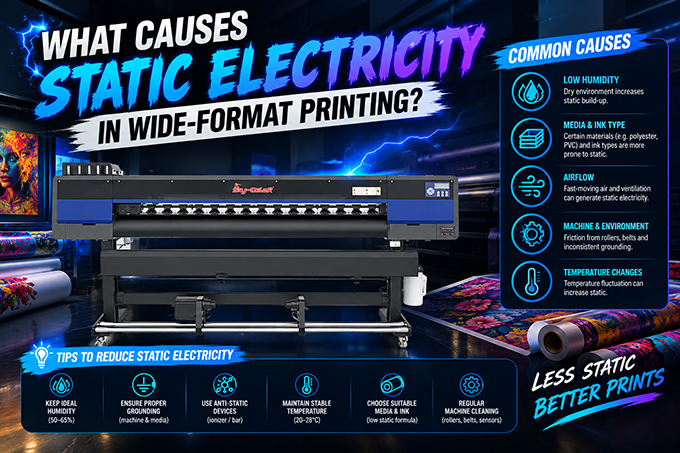
Step 1 — Control humidity first.
This is the single most effective fix. Keep relative humidity above roughly 40%, ideally with the room at 20–32°C (68–90°F). A simple room humidifier in the print area during dry winter months resolves a large share of static-related defects without any equipment changes.
Step 2 — Ground the printer and work area.
Confirm the printer itself is properly grounded, and consider grounding a bare copper wire across the back of the machine near where media travels — a low-cost fix that's specifically effective against the magenta-channel-loss symptom common with backlit film and vinyl in dry conditions.
Step 3 — Add anti-static tools at the media feed point.
Anti-static brushes or wands that make contact with the substrate before it enters the print zone help discharge built-up static as media feeds in. For higher-volume operations, an ionizing air bar or handheld ionizing gun neutralizes charge more thoroughly across wider media.
Step 4 — Change the flooring or mats around the machine, if needed.
Carpeting is a common static source from foot traffic near the printer. Non-conductive rubber or vinyl mats around the work area reduce static generated by people and equipment moving nearby, which can transfer to the printer and media.
Step 5 — Handle and store media correctly.
Let media acclimate to room temperature and humidity before loading it, and avoid dragging rolls across carpet or dry flooring during handling — both add unnecessary static charge before the material even reaches the printer.
Why does my printer lose the magenta channel specifically?
This is a well-documented static-related symptom in dry conditions, particularly with backlit film and vinyl. It's caused by static discharge disrupting the ink droplet path for that specific channel, and it's commonly resolved by grounding a copper wire across the back of the printer rather than by any ink or hardware repair.
Is static electricity dangerous, or just an annoyance?
Both. Beyond causing print defects and productivity losses from jams and misfeeds, static discharge can shock operators and, in solvent-based printing environments, carries a small fire-risk consideration — which is another reason proper grounding matters, not just print quality.
Does static only happen in winter?
It's most common in winter for temperate climates because heating systems dry out indoor air, but in naturally arid regions, static problems can occur year-round regardless of season.
Can a humidifier really fix a printing defect?
Yes, in many cases. Raising relative humidity above roughly 40% is consistently cited as the most effective single fix for static-related print defects, often resolving issues that look like a printhead or ink problem but are actually environmental.
Do I need expensive equipment to fix static problems?
Not necessarily. A room humidifier, a grounded copper wire, and anti-static mats are low-cost fixes that resolve the majority of cases. Ionizing air systems and dedicated static-control kits are worth considering only if basic humidity and grounding fixes don't fully resolve the issue on high-volume production lines.
Getting unexplained print defects that come and go with the season?
Before assuming it's a printhead or ink issue, check your shop's humidity and grounding setup. Stormjet's technical support team can help you diagnose whether a defect is static-related or something else specific to your machine.
Contact Our Support Team → https://wa.me/8617700639356