


20
Sep
A practical guide for print shop owners looking to lower their biggest recurring expense — ink — without cutting corners on the finished product.
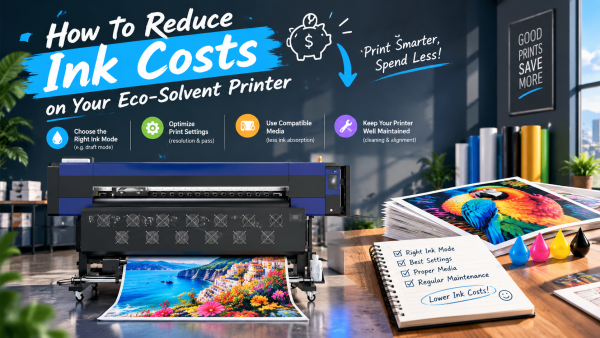
QUICK ANSWER: Ink is typically the largest ongoing cost in eco-solvent printing, and most shops can realistically cut consumption by 15–30% through a combination of five changes: using your RIP software's ink estimation and print mode settings to match ink density to the actual job (banners viewed from a distance don't need photo-quality saturation), building and using correct ICC profiles to avoid over-inking to compensate for color inaccuracy, replacing heavy neutral-tone CMYK mixes with black ink where possible, keeping the printer well maintained to avoid ink-wasting emergency deep cleans, and choosing media that doesn't require extra ink passes to look right. None of these require new hardware — they're workflow and settings changes you can make this week.
Ink is usually the single biggest recurring cost in an eco-solvent print shop — bigger than electricity, bigger than routine maintenance, and often bigger than the printhead replacements it occasionally causes. The good news is that most of the waste isn't from the printer itself; it's from settings, profiles, and habits that can be fixed without spending a cent on new equipment. Here's where the real savings are.
| Strategy | Typical Savings | Effort to Implement |
|---|---|---|
| Match print mode to the job (draft vs. production vs. photo quality) | 10–20% | Low — a settings change per job |
| Use correct ICC profiles instead of over-inking to compensate | 10–15% | Medium — one-time profile setup |
| Substitute black ink for neutral CMYK mixes (GCR) | 5–10% | Low — RIP software setting |
| Reduce emergency deep cleans through better maintenance | 5–10% | Low — routine habit change |
| Choose media suited to the ink system | Varies | Low — sourcing decision |
Most RIP software offers multiple print modes — draft, standard production, and high-quality/photo modes — each using a different ink density and pass count. A banner that will be viewed from several meters away doesn't need the same ink saturation as a close-up product label, but many shops default to their highest-quality setting for every job out of habit. Reviewing your RIP's ink estimation tool before sending a job to print lets you catch over-specified jobs before they waste ink unnecessarily.
This is one of the most overlooked sources of waste: when colors look inaccurate, many operators respond by pushing more ink into the print to try to "force" the right shade — which almost never fixes the underlying issue and consistently increases ink usage, dry time, and the risk of smudging or banding. Building or loading the correct ICC profile for your exact ink and media combination fixes the root cause and typically uses noticeably less ink than compensating manually. (If this is a recurring issue in your shop, see our color-matching troubleshooting guide for the full fix process.)
In CMYK printing, dark neutral tones and shadows are often built from heavy combinations of cyan, magenta, and yellow rather than black ink alone — a technique called Gray Component Replacement (GCR) can shift more of that neutral tone onto the cheaper black channel instead. Most RIP software has a GCR or black generation setting; increasing it moderately reduces total ink volume on jobs with significant shadow or neutral content without a visible difference in the final print.
Cleaning cycles consume ink every time they run, and a printer that's frequently clogging forces far more cleaning cycles — and far more wasted ink — than one that's properly maintained. A daily nozzle check habit, correct capping station maintenance, and using manufacturer-recommended ink (see our printhead clogging guide) prevents the kind of emergency deep-cleaning cycles that quietly become one of the largest hidden ink costs in a shop.
Some lower-quality or incompatible media absorbs ink unevenly, forcing operators to run extra passes or higher ink density just to get consistent, opaque coverage. Media specifically suited to your ink and printhead combination typically achieves full color and opacity with less ink than off-spec or mismatched substrates — an often-overlooked factor when comparing "cheap" media against its real cost per job.
Bulk ink systems and compatible third-party inks are sometimes marketed as an ink-cost shortcut, and in some cases they can lower cost per milliliter. However, ink not formulated for your specific printhead is one of the leading causes of permanent clogs and voided warranties — so any switch away from manufacturer-recommended ink should be verified with the printer manufacturer first, not decided on price alone. A cheaper ink that damages a $1,000+ printhead is rarely a net savings.
How much can a print shop realistically save on ink?
Most shops combining print mode optimization, correct ICC profiles, and better maintenance see a 15–30% reduction in ink consumption without any visible drop in print quality — the exact number depends on how much waste was happening beforehand.
Does reducing ink usage always mean lower print quality?
No — most of the biggest savings come from removing waste caused by incorrect settings or profiles, not from cutting quality on purpose. Deliberately reducing ink density is only appropriate for jobs where the viewing distance or use case doesn't require maximum saturation.
Is switching to third-party ink a good way to save money?
It can lower ink cost per milliliter, but ink not designed for your specific printhead system is a leading cause of permanent clogs, so any switch should be confirmed as compatible with the manufacturer first — a damaged printhead costs far more than the ink savings.
What's the single easiest change to start with?
Reviewing your RIP software's default print mode and ICC profile settings is usually the fastest, lowest-effort place to start, since most shops are running higher ink density than the job actually requires without realizing it.
Does poor maintenance really affect ink costs that much?
Yes — a printer needing frequent deep cleans due to clogging can waste a meaningful amount of ink over a year compared to a well-maintained machine, on top of the printhead replacement costs that chronic clogging eventually causes.
Stormjet's technical support team can review your typical settings, ink type, and maintenance routine to identify where you're likely losing ink unnecessarily — before it shows up as a bigger cost down the line.
Contact Our Support Team → https://wa.me/8617700639356