

06
Oct
A practical process guide for sign shops producing outdoor signage, billboards, and building wayfinding on ACP/ACM panels.
QUICK ANSWER: UV printing directly onto aluminum composite panel (ACP/ACM) works because UV-curable ink cures instantly on contact with the coated aluminum surface — no lamination, no mounting, and no separate substrate needed. The process involves cleaning the panel, setting the correct bed height and vacuum hold on a UV flatbed printer, printing CMYK (plus white ink for dark or brushed panels), and instant UV curing. Properly cured UV ink on ACP typically holds up 2–3+ years outdoors unlaminated, making it one of the most cost-effective premium signage materials available.
Aluminum composite panel has become one of the most common substrates in outdoor signage — it's light, rigid, weather-resistant, and has a smooth factory-coated surface that takes UV ink extremely well. But most of what's written online about "UV printing on ACP" is either panel sales listings or vague marketing copy. This guide walks through the actual printing process, what equipment it requires, and what determines print quality and durability.
Step 1 — Clean the panel surface.
Wipe the ACP sheet with isopropyl alcohol or a dedicated panel cleaner to remove dust, fingerprints, and manufacturing residue. Even small amounts of oil or dust can cause ink adhesion failure or pinholing.
Step 2 — Confirm the coating type.
Check whether the panel has a PE (polyethylene) or PVDF (fluorocarbon) coating. PVDF-coated panels are more weather-resistant but can be slightly less receptive to ink adhesion than PE-coated panels — run a small adhesion test if you're using a new panel supplier.
Step 3 — Load the panel and set bed height.
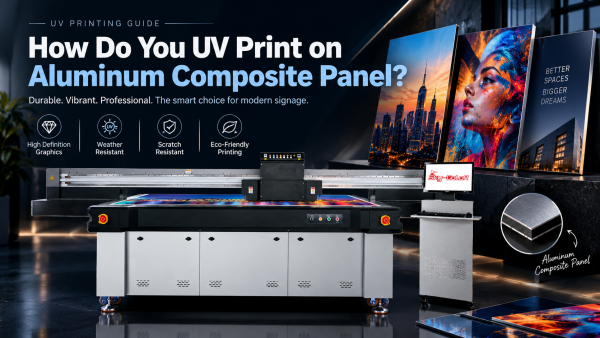
Place the panel on the UV flatbed printer's vacuum table and set the correct gap between the printhead and the panel surface. A UV printer with a wide print area, like Stormjet's SC-2513 (2500 × 1300mm bed), can handle full ACP sheets without needing to tile or reposition the panel mid-job.
Step 4 — Print a white base layer if needed.
For brushed, colored, or non-white ACP panels, print a white ink layer first so that CMYK colors remain accurate and vibrant rather than shifting toward the panel's base color or metallic texture.
Step 5 — Print the CMYK design.
The printhead deposits CMYK ink directly onto the panel (or onto the white base layer), building the full-color design in a single pass or multiple layers depending on the design's color depth.
Step 6 — UV lamps cure the ink instantly.
As the printhead moves across the panel, UV LED lamps cure each layer of ink on contact. There's no drying or off-gassing wait — the panel is ready to handle and cut immediately after printing finishes.
Step 7 — Apply a varnish layer for extra protection (optional).
For signage that will face intense sun exposure or frequent cleaning, a UV varnish top layer adds scratch resistance and can boost color vibrancy, extending the practical outdoor lifespan of the print.
| Factor | Why It Matters |
|---|---|
| Ink curing quality | Under-cured ink stays slightly soft and is more prone to scratching, fading, and chemical attack from pollution and rain |
| Panel coating type | PVDF-coated panels generally outperform PE-coated panels for long-term outdoor UV and weather resistance |
| Surface preparation | Residual dust, oil, or moisture before printing is the most common cause of premature ink lifting or peeling |
| Varnish/laminate layer | An optional protective top layer extends print life and improves scratch and UV resistance for harsh environments |
| Installation orientation | South- or west-facing panels in direct sun degrade faster than shaded or north-facing installations |
These applications overlap closely with the signage and advertising use cases covered in our guide on large format printer buying decisions — many sign shops run both an eco-solvent printer for flexible banner work and a UV flatbed printer for rigid ACP and board signage side by side.
Do I need to prime or pre-treat ACP before UV printing?
Usually not — most ACP panels come with a factory PE or PVDF coating designed for good ink adhesion. A thorough alcohol wipe-down is typically sufficient preparation.
How long does UV-printed ACP signage last outdoors?
Unlaminated UV print on ACP typically lasts 2–3+ years outdoors depending on sun exposure and climate, with a protective varnish layer extending that further.
Can UV printers handle full-size ACP sheets without tiling?
It depends on the printer's bed size. A UV flatbed printer with a bed around 2500 × 1300mm can print most standard full-size ACP sheets in a single pass without repositioning.
Does the ACP panel color affect print quality?
Yes. Darker or metallic/brushed panels generally need a white ink base layer first to keep CMYK colors accurate; printing directly onto dark panels without a white base will shift and dull the final colors.
Is UV printing on ACP more cost-effective than laminated vinyl on ACP?
Direct UV printing eliminates the material and labor cost of printing, laminating, and mounting vinyl separately, which generally makes it faster and more cost-effective for medium-to-large production runs.
Want to see if a UV flatbed printer fits your signage production line?
Stormjet's team can walk you through bed size, white ink setup, and panel compatibility for ACP, Dibond, and similar rigid signage substrates.