


How Long Should Eco-Solvent Prints Dry Before Lamination?
Eco-solvent printing is widely used for vehicle graphics, self-adhesive vinyl, stickers, banners, and outdoor advertising. However, printing the artwork is only one part of the production process. If the printed material is laminated too early, trapped solvent can contribute to bubbles, haziness, edge lifting, and poor adhesion.
So, how long should you wait before laminating an eco-solvent print? The answer depends on the ink, media, ink coverage, drying conditions, and recommendations from the material manufacturer.
Quick Answer: How Long Should Eco-Solvent Prints Dry?
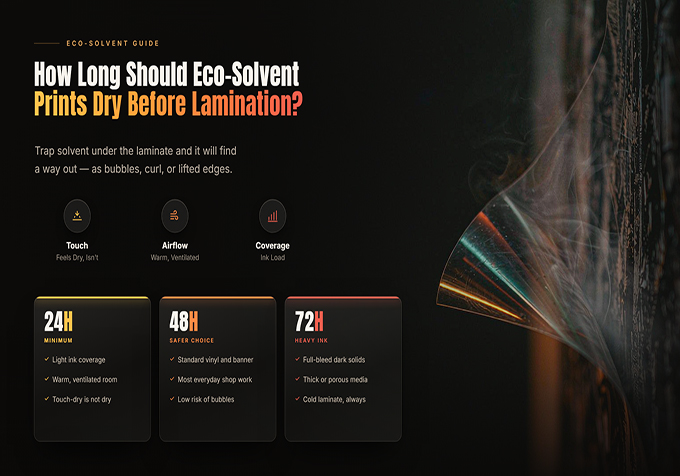
For many eco-solvent printed vinyl applications, 24 hours is a common minimum drying or outgassing guideline, while 48–72 hours may be recommended for heavy ink coverage or demanding applications. Always follow the specific ink and media manufacturer's instructions. A print that feels dry on the surface is not necessarily ready for lamination.
1. Why Do Eco-Solvent Prints Need to Dry Before Lamination?
Eco-solvent ink contains a solvent carrier that must evaporate after printing. During this process, residual solvent needs sufficient time and suitable conditions to escape from the printed media.
Lamination adds a protective film and adhesive layer over the printed surface. If the print is laminated before it has adequately dried, residual solvent may become trapped between layers and interfere with the finished graphic.
Possible consequences include:
- Bubbles or haziness: The laminate may not form a consistent bond with the printed surface.
- Edge lifting: The adhesive system may be affected, increasing the risk of edges lifting after installation.
- Wrinkling or distortion: Some films may change shape as residual solvent escapes.
- Reduced adhesion: The laminate or finished graphic may not perform as expected.
- Rework and material waste: Defective graphics may need to be reprinted and laminated again.
The exact result depends on the materials and process. Not every early-laminated print will develop defects, but following the recommended drying period helps reduce the risk.
2. How Long Should You Wait Before Laminating?
Drying time should be determined by the ink and media manufacturer's technical guidance, not by a universal timer.
| Print Condition | Planning Guidance | What to Consider |
|---|---|---|
| Light ink coverage | Follow the media manufacturer's minimum drying period. | Confirm that the ink and media combination is approved for lamination. |
| Typical vinyl graphics | 24 hours is a common minimum guideline. | Use the actual product data sheet to confirm the requirement. |
| Dark designs or heavy ink coverage | 48–72 hours may be recommended. | Higher ink loads can require longer outgassing. |
| Cool, humid, or poorly ventilated conditions | Allow additional time when required. | Confirm suitable room conditions and airflow. |
These times are planning references, not guarantees. For example, ORAFOL recommends at least 24 hours of outgassing for its specified solvent-printed graphics and prefers 48–72 hours for heavily saturated prints in the relevant guidance. Always check the instructions for your actual media and ink combination.
3. What Factors Affect Eco-Solvent Print Drying Time?
Ink Coverage and Image Density
Large solid-color areas, dark graphics, and highly saturated images can deposit more ink than light designs. More ink can mean more solvent needs to escape before lamination.
If a job contains dense black areas, rich colors, or large photographic images, do not assume it will be ready at the same time as a lightly printed design.
Media Type and Construction
Self-adhesive vinyl, banner material, backlit film, and other flexible media can behave differently. Their coatings, thicknesses, and adhesive construction may affect how the printed material dries and how it performs during finishing.
Use the media profile and technical documentation intended for the actual substrate. A profile designed for one material should not automatically be applied to another.
Temperature, Humidity, and Airflow
Environmental conditions influence the drying process. A poorly ventilated space can slow the removal of solvent vapors, while unsuitable temperature or humidity may affect print quality and material handling.
Follow the recommended operating and drying conditions for your printer, ink, and media. Keep the drying area appropriately ventilated and observe applicable workplace safety requirements.
Printer Heater Settings and Ink Limits
Printer heaters can help the ink dry during production, but a print that exits the machine feeling dry is not necessarily fully ready for lamination.
Use validated heater settings and ink limits for the selected media. Increasing heat or ink density without testing may cause other problems, such as media deformation, curling, or inconsistent output.
4. How Should You Dry Printed Vinyl Before Lamination?
A consistent post-print workflow makes it easier to prepare graphics for finishing.
- Finish the print job: Allow the material to exit the printer without contacting wet ink or other surfaces.
- Provide airflow: Place the print in a suitable, well-ventilated drying area.
- Avoid tight winding: Do not tightly rewind fresh prints, because close layers can restrict solvent escape.
- Protect the surface: Keep the print away from dust, moisture, direct contamination, and unnecessary handling.
- Wait for the specified period: Follow the ink and media manufacturer's instructions, allowing longer when required.
- Inspect before finishing: Check for visible defects and confirm that the print is suitable for lamination.
- Laminate using approved settings: Follow the laminate manufacturer's instructions for roller pressure, temperature, and speed.
Printed sheets can often be laid flat on a suitable rack. Roll media should be stored or supported in a way that allows air to circulate, following the media supplier's guidance. Avoid stacking fresh prints tightly together.
5. How Can You Tell Whether a Print Is Ready for Lamination?
Appearance alone is not a reliable way to determine whether all residual solvent has escaped. A print can feel dry to the touch while still requiring more drying time.
Before laminating, check the following:
- The recommended drying period for the ink and media has been met.
- The print has been stored with sufficient airflow.
- The material is not visibly wet, tacky, distorted, or contaminated.
- The selected laminate is compatible with the printed media.
- A test sample has been evaluated when the application or material combination is new.
For high-value vehicle graphics, outdoor signage, and other demanding applications, do not shorten the drying period simply because the production schedule is tight.
6. What Happens If You Laminate Too Early?
Premature lamination can create defects that are difficult to correct once the graphic has been finished.
| Problem | Possible Explanation | Prevention |
|---|---|---|
| Bubbles or haziness | Residual solvent or bonding issues | Allow adequate outgassing and follow lamination instructions. |
| Curling edges | Material movement or adhesive performance problems | Check drying time, material compatibility, and finishing settings. |
| Poor laminate adhesion | Incomplete drying or incompatible materials | Verify the recommended ink, media, and laminate combination. |
| Wrinkles or distortion | Material instability or unsuitable finishing conditions | Use validated temperature, pressure, and handling procedures. |
If a defect appears, inspect the drying process, media, laminate, and finishing settings before assuming the printer itself is faulty.
7. A Practical Workflow for Sign Shops
For businesses producing vinyl decals, vehicle graphics, and outdoor signage, a planned finishing workflow can prevent drying time from becoming an unexpected bottleneck.
- Confirm the media and laminate requirements before printing.
- Choose the correct media profile and validated print settings.
- Schedule printing early enough to allow the required drying period.
- Use a ventilated drying area with appropriate material support.
- Record the print time and the earliest permitted finishing time.
- Inspect and laminate the print according to supplier instructions.
- Allow any additional time required before installation or delivery.
This workflow helps operators plan production realistically instead of trying to compensate for insufficient drying by changing lamination settings.
Frequently Asked Questions
Can I laminate eco-solvent prints immediately after printing?
Generally, no. Eco-solvent prints often need an outgassing period before lamination. Follow the specific media and ink manufacturer's instructions; 24 hours is a common minimum guideline for many applications.
Is 24 hours enough for every eco-solvent print?
No. Heavy ink coverage, certain media constructions, and environmental conditions may require a longer period. Some applications recommend 48–72 hours for heavily saturated graphics.
Why does my laminated vinyl develop bubbles?
Possible causes include residual solvent, incompatible materials, contamination, or unsuitable lamination settings. Check the full production process rather than assuming that every bubble is caused by drying time alone.
Can I tightly rewind a fresh eco-solvent print?
Avoid tightly winding fresh prints when the material requires outgassing. Closely packed layers can restrict airflow and trap solvent. Follow the media manufacturer's storage and drying instructions.
Do all eco-solvent prints need lamination?
No. The need for lamination depends on the application, expected wear, environmental exposure, media, ink, and durability requirements. Lamination may be beneficial for vehicle graphics and demanding outdoor applications, but follow the relevant material recommendations.
Plan Your Eco-Solvent Production with Stormjet
Successful eco-solvent printing involves more than image quality and printing speed. Drying, finishing, media compatibility, and handling all contribute to the final result.
By allowing the correct outgassing time and following a consistent workflow, print shops can reduce avoidable finishing problems and deliver more reliable graphics to their customers.
Visit Stormjet to explore our large-format printing solutions or contact our team to discuss your production requirements.
Looking for an Eco-Solvent Printing Solution?
Tell us about your printing materials, applications, and production goals. Our team can help you discuss a suitable printer configuration for your business.
Email: sale@stormjet.net
WhatsApp: +86 177 0063 9356
Website: www.stormjet.net
Stormjet — Your Printing Partner.


